
Prerequisites
VPN connection already has been configured and tested by IT team
Connect to VPN quickly from your taskbar
|
1 |
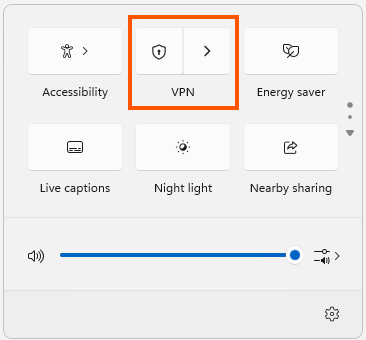
On your taskbar, select the Network, Volume, Battery icon > VPN. |

|
|
2 |
If you have one VPN configured, you can turn it on and off by toggling the left side of the VPN quick setting |
|
|
3 |
If prompted, enter your username and password or other sign in info. |
|
Connect to VPN from the Windows Settings page
|
1 |
In the Settings app on your Windows device, select Network & internet > VPN. |
|
|
2 |
Next to the VPN connection you want to use, select Connect. |
|
|
3 |
If prompted, enter your username and password or other sign in info. |
|
|
4 |
|
|